
How to configure the 1024proxy proxy in the BitBrowser?
 Erik Magnus Svensson
 2026-01-13 16:00
BitBrowser primarily enables multiple browser profiles and multiple account logins (FB/TK/X/WS, etc.) to prevent account bans due to cross-window association. Each window simulates independent computer information and proxy addresses, ensuring an independent and isolated profiles, thus enhancing account security! Developed using the Google Chrome and Firefox kernels, it achieves a physically secure and clean environment. Browser windows are 100% independent of each other. Combined with multi-employee collaborative management features, it improves your account security and operational efficiency! 10 free profiles are included. Click to try it now.
Log in to the 1024proxy official website and select the package type you want to purchase according to your needs, and extract the Native IP (long-term static, dynamic traffic, unlimited package – bandwidth, unlimited package – port).
Download Bit Browser, install and log in to Bit Browser.

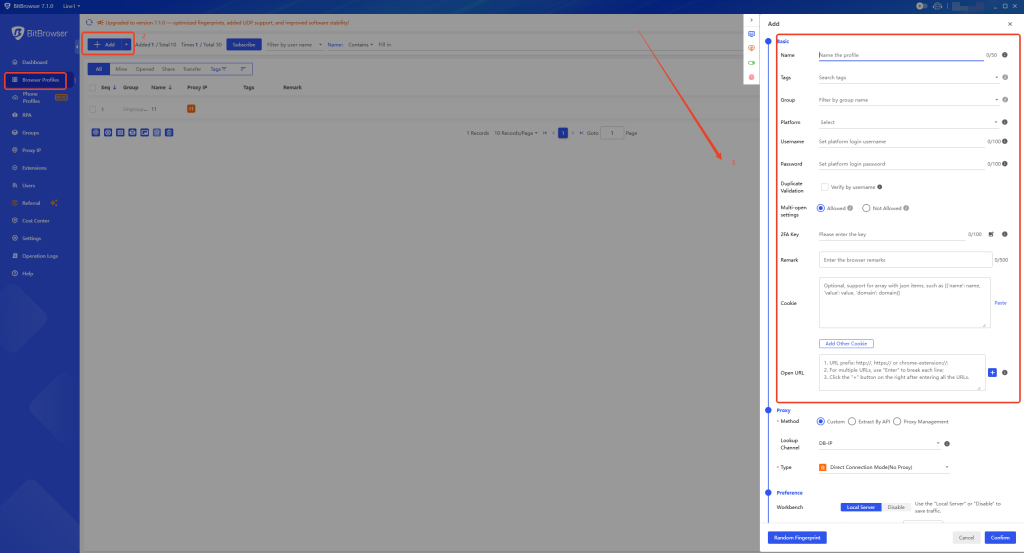
New Window: [Browser Profiles] – [Add], a detailed information page as shown below will appear. Fill in the information in the [Basic ] section.
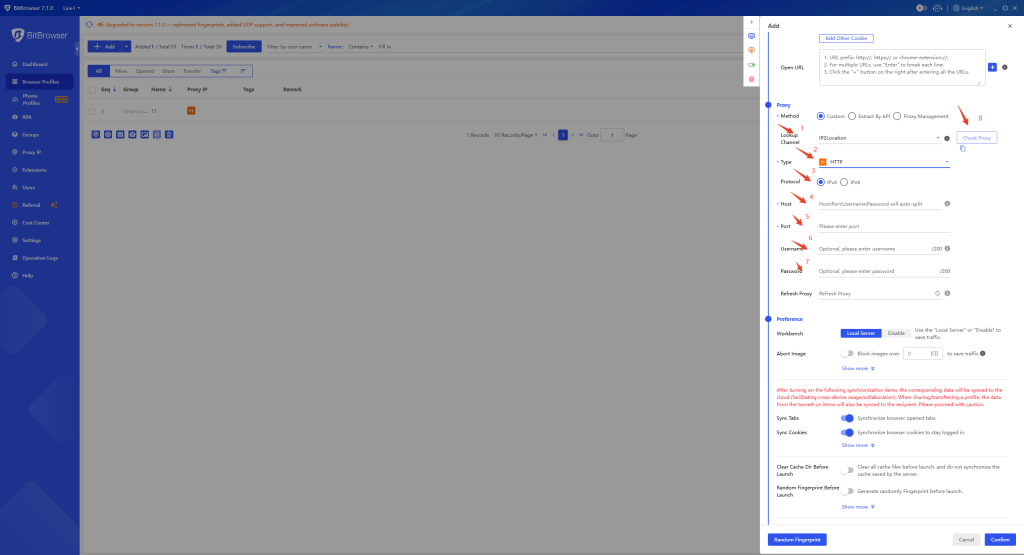
Configure proxy: Locate the [Proxy] module, select “Custom Proxy” for the [Proxy Method], choose “HTTP, HTTPS, or Socks5” for the [Proxy Type], then fill in the proxy information of 1024proxy in the corresponding fields, click [Proxy Detection] to test the connectivity of the proxy, confirm that it is correct, and then click [Confirm] to complete the creation of the browser window.
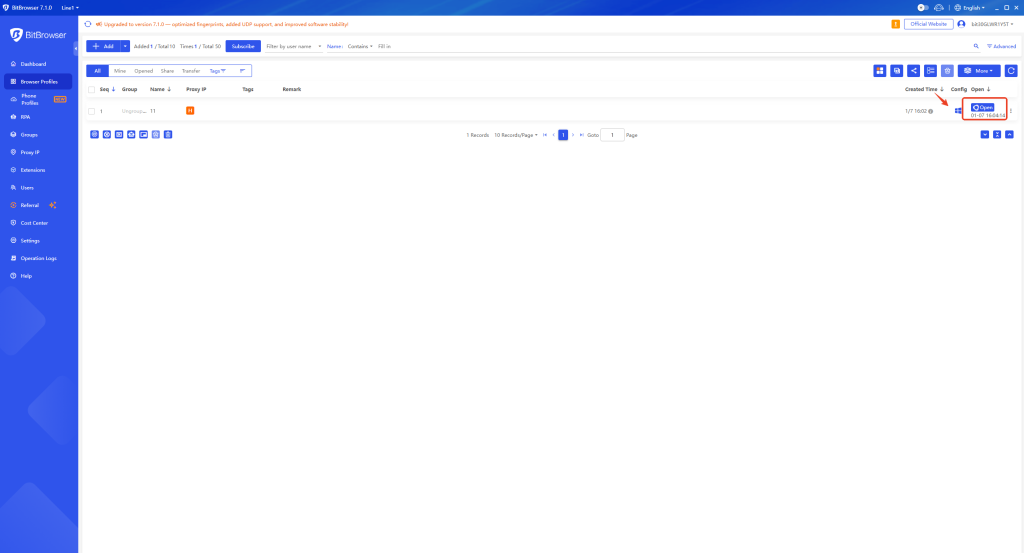
After the configuration is completed, select the configured browser and click “Open” to proceed.
BitBrowser also integrates cloud phone functionality: It matches parameters from a massive number of real mobile phones, allowing one device to easily manage multiple cloud phones!
Configuration is simple; just configure a proxy to easily access major global apps. It supports one-click device switching and efficient mobile environment rotation! For more usage options, click to claim vouchers for BitCloudphones:
HOOQZVCDLG, NEZRTDN1XJ, 9XHG9SSANO, VDCZ8TNUWC, APNZD43I70, WTRZ6KCD9G, JEJ3P46KOE, VNHV6BML5O, JAYZWHGPPE, AJFX0NWPMA, YQGKLL4FNH, 02MKV8KEYH, TGUVFETM7D, ROJHBKWANR, XKUEFS6GA0, DPCKIMWS9Z, WR1YEKSWBJ, Z4E4ANMWGV, 7WAZQREIZO, B9CX9323VH
1. Simple and quickPhoneprofiles:
Automatically matches real phone parameters, efficiently completing the entire overseas environment configuration! One-click configuration of proxy networks for a high-speed, stable, and secure network environment. Native support for Google Play, allowing seamless use of international apps and services.
2. Simulates Massive Parameters for a Realistic Environment
Simulates massive parameters using real mobile phone chips to provide a more realistic overseas mobile phone environment. Automatically matches core settings such as language, time zone, location, carrier, and SIM information based on Native IP address. Supports over 600 global carriers, automatically simulating SIM information and simulating various mobile phone sensor parameters.
3. Easily Set Sub-Account Permissions for Convenient Account Asset Management
Flexibly allocate team sub-account permissions and dynamically adjust the number of mobile phone environments each sub-account can use, efficiently managing account assets.
The ability to flexibly adjust the number of mobile phone environments maximizes operational cost optimization. Sub-accounts operate independently, maximizing the use of idle resources and improving environment utilization. Easily acquire a massive number of overseas customers and achieve matrix marketing!
The combination of a fingerprint browser and 1024 dynamic/static Native IPs essentially controls both “device identity” and “network identity” simultaneously.
Different Native IP types achieve different effects and are suitable for different businesses.
Anti-detect Browser = Who you are (device, system, browser)
Native IP = Where you come from (network, region, carrier)
Core effects achievable by the combination:
Anti-detect Browser + 1024 static Native IPs: Long-term stable accounts, no identity change
Anti-detect Browser + 1024 dynamic Native IPs: Batch operations, anti-blocking switching
Anti-detect Browser + combination of static and dynamic Native IPs: Account nurturing + volume expansion + risk control countermeasures (optimal solution)
Multi-accounting association, multiple logins for e-commerce store accounts, well-maintained social media matrix. Choose 1024 proxy Native IPs + BitBrowser.
