




Pricing
Products
Get Proxies
Resources
Language


Pricing -70%
Dynamic Residential

Dynamic Residential Traffic (GB)
Suitable for: Data collection, market research, and data collection.
Starting from
$0.49 /GB
Premium Dynamic Residential Traffic 
Suitable for:price monitoring, AI data scraping and other high-demand scenarios.
Starting from
$0.90 /GB

Dynamic Residential IP (Lines)
Suitable for: Email registration, web scraping, surveys, and other use cases.
Starting from
$0.027 /IP

Unlimited traffic - bandwidth
Suitable for: high-volume downloads of audio, video, and other data.
Starting from
$34.5/day

Unlimited Traffic - Port
Suitable for: questionnaire surveys, text and image downloads, and Brand protection.
Starting from
$0.31/Port/day
Static Residential
Products
Products
SERP API
Get real-time search engine results with multi-engine and multi-region support.
Dynamic Residential Traffic
Global resources with precise city-level positioning.
Unlimited Residential Traffic
Supports multiple ports and high bandwidth, unlimited traffic IPs with no extra fees.

Long-term Static ISP
Exclusive long-term static resources, providing unparalleled speed and reliability.
Popular Areas
Get Proxies
Resources
Get Started
What Is a Home Broadband VPS? Key Features and Use Cases
 Ivan Dmitriy Petrov
 2026-11-24
When choosing a server, most people start by comparing CPU, memory, storage, and bandwidth. However, if your business needs to access websites or online services from a specific region, the type of network connection your server uses is also worth considering.
Most standard VPS solutions connect to the internet through data center networks. A Home Broadband VPS, on the other hand, combines a virtual server environment with a residential broadband connection. You still get the computing resources of a VPS, but its external traffic goes through a home broadband connection. Although both are VPS solutions, their main differences lie in network routing, IP characteristics, and suitable use cases.
So, what exactly is a Home Broadband VPS? How does it differ from a standard VPS, Residential IP VPS, or Native IP VPS? And what should you check before choosing one? Understanding the basics of home broadband and VPS hosting first makes it easier to see how they work together and whether this type of server fits your needs.
A Home Broadband VPS combines two concepts: home broadband and a Virtual Private Server. The first describes how the server connects to the internet, while the second describes its virtual server environment. Understanding both helps explain how this type of VPS works.
Home broadband refers to internet access services provided by Internet Service Providers (ISPs) for residential users. Common fiber broadband connections fall into this category. Wi-Fi, meanwhile, is simply a wireless way to connect devices to a local network and is not the same as broadband itself.
Home broadband connects to the internet through a local ISP. Its public IP address may be dynamically assigned by the provider or remain relatively stable depending on the service plan. Unlike data center networks, residential broadband is primarily designed for everyday internet use by individuals and households.
A home broadband IP generally refers to an IP address associated with a residential broadband connection. Its actual characteristics, assignment method, and classification in third-party IP databases depend on the ISP’s network configuration and the database’s classification standards.
VPS stands for Virtual Private Server. It uses virtualization technology to divide a physical server into multiple relatively independent virtual server environments.
Each VPS receives a certain amount of CPU, memory, storage, and network resources and can run its own operating system. Users can connect remotely through tools such as Remote Desktop or SSH to install software, deploy applications, and manage the system.
In simple terms, a VPS is a virtual server that you can access remotely. The network it uses to connect to the internet depends on the hosting provider’s infrastructure.
A Home Broadband VPS combines a virtual server environment with a residential broadband network connection.
Its operation is similar to that of a standard VPS. You can connect remotely, install an operating system, run applications, and adjust server settings. The main difference is that its outbound internet traffic uses a home broadband connection rather than a standard data center network.
The difference can be summarized as follows:
A Home Broadband VPS does not necessarily have to be physically located inside a residential property. Some providers host the VPS in another server environment and connect it to a residential broadband exit through a gateway or traffic forwarding setup. This means the server’s physical location and its actual network route are not necessarily the same.
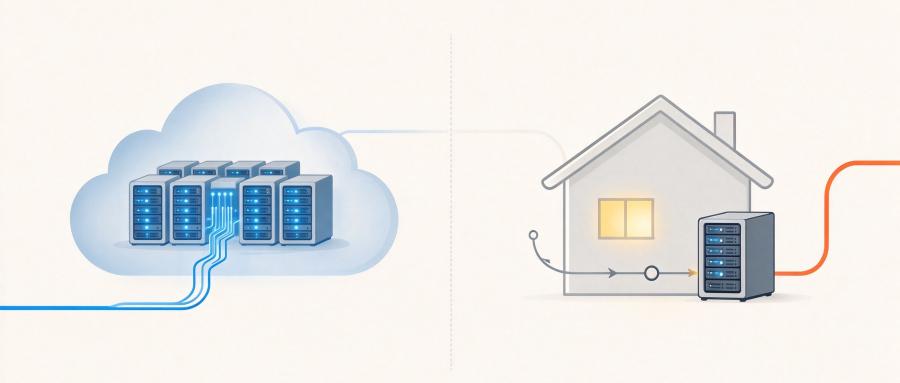
The main characteristic of a Home Broadband VPS comes from its residential network connection. Actual performance can vary depending on the provider’s network architecture, IP assignment method, and broadband plan.
Providers commonly use two approaches to build Home Broadband VPS services:
Regardless of the setup, the important question is which network route the VPS actually uses when accessing the internet. Even if the server is hosted in a data center, it may still have a home broadband exit if its outbound traffic ultimately passes through a residential broadband line.
ISP and ASN information can help identify the provider and network organization associated with an IP address. If the lookup shows a local residential broadband provider, this can serve as a useful reference. However, these details alone cannot prove that traffic actually passes through a home broadband connection.
Home Broadband VPS plans commonly offer two types of IP addresses based on how they are assigned: dynamic IPs and static IPs.
A dynamic IP does not necessarily change every time you connect, and a static IP is not guaranteed to remain unchanged forever. The assignment method, fixed period, and replacement policy depend on the provider’s actual service terms.
The bandwidth of a Home Broadband VPS is generally affected by the residential broadband plan, local ISP, and network conditions. Some home broadband connections offer asymmetric upload and download speeds, meaning upload speeds may be considerably lower. Network speed and latency may also fluctuate during peak usage hours.
Besides checking the bandwidth specifications provided by the hosting provider, you can run a few tests to understand the actual network performance:
Win + R, type cmd, and press Enter to open Command Prompt. Then run ping example.com -n 50, replacing the example domain with your target website. On Linux or macOS, open the terminal and run ping -c 50 example.com. The results help you check response times and packet loss.It is a good idea to repeat these tests at different times, especially during the hours when you expect to use the server. A single test only reflects network conditions at that moment and cannot represent long-term performance.
Residential broadband is primarily designed for everyday internet use. Its bandwidth, upload-to-download ratio, and connection stability may all be affected by the service plan and ISP policies. Therefore, a Home Broadband VPS does not automatically mean faster speeds or a more stable connection. Its defining feature is the use of a residential broadband exit, not higher data transfer performance. If your workload involves sustained high-volume transfers or heavy concurrency, you should evaluate the actual bandwidth and network configuration before choosing a plan.
When comparing hosting services, you may come across terms such as Home Broadband VPS, standard VPS, Residential IP VPS, and Native IP VPS. These terms do not describe different names for the same product. Instead, they refer to different aspects of server hosting, network routing, and IP characteristics.
Both Home Broadband VPS and standard VPS provide virtual server environments. Users can connect remotely, install operating systems, and run applications on either type. The biggest difference is the network connection: standard VPS plans generally use data center networks, while Home Broadband VPS plans use residential broadband connections.
| Comparison | Home Broadband VPS | Standard VPS |
|---|---|---|
| Network connection | Residential broadband line | Data center or cloud provider network |
| IP network characteristics | Usually associated with a local residential ISP | Usually associated with a data center or cloud provider |
| IP stability | Dynamic or static, depending on the plan | Usually provides a static IP, depending on the provider |
| Bandwidth performance | Affected by the broadband plan and ISP policies | Depends on data center routing and plan specifications |
| Resource availability | Limited by local residential broadband resources | Generally offers more choices in locations, configurations, and bandwidth |
| Suitable use cases | Applications requiring a residential broadband exit | General hosting, development, deployment, and data processing |
It is important to distinguish an IP address’s geographic location from its network type. A data center IP can also be located in the United States, the United Kingdom, or another country. Therefore, the IP’s location alone cannot determine whether it comes from a residential broadband connection.
These three terms describe different network characteristics. They should not be treated as three mutually exclusive server types.
Home Broadband VPS: Focuses on the Actual Network Connection
The key factor is whether outbound traffic passes through a residential broadband line. This term describes the actual network connection used by the server, rather than how a third-party database classifies its IP address.
Residential IP VPS: Focuses on the IP’s Residential Network Classification
A Residential IP VPS generally refers to a VPS that uses an IP address classified as residential by third-party databases. This describes the IP’s network classification, but a Residential IP label alone does not prove that traffic passes through a real home broadband connection.
Native IP VPS: Focuses on the IP’s Geographic Registration
A Native IP VPS generally describes network resources whose IP registration location matches the region where the IP is actually used. Common reference points include IP registration records, allocation information, and geolocation databases. However, the term does not have a universally accepted industry definition, so different providers may use it differently.
Here, geographic registration refers to the region associated with the IP address, not the physical location of the server.
Home Broadband VPS, Residential IP VPS, and Native IP VPS can overlap, but they are not interchangeable terms.
Some Home Broadband VPS products use IP addresses that third-party databases classify as residential because they are associated with local residential broadband networks. However, some Residential IP products use addresses labeled as residential without routing traffic through an actual home broadband connection.
Home Broadband VPS and Native IP VPS are not mutually exclusive either. If a Home Broadband VPS uses an IP whose registered location matches its actual usage region, it may have both residential broadband connectivity and native IP characteristics. Conversely, a standard data center server may also use an IP address associated with its local region.
You can evaluate a product from three separate perspectives:
| Dimension | What It Describes | What to Check |
|---|---|---|
| Network connection | The route used by outbound traffic | Whether it uses residential broadband |
| IP network type | How the IP is classified | Network type in third-party IP databases |
| IP geographic location | The region associated with the IP | Registration records, allocation information, and geolocation data |
These three dimensions can complement each other and may appear together in the same product, but they cannot replace one another. Before choosing a service, identify whether your business actually requires a residential broadband connection, a residential IP classification, or an IP associated with a specific region.
A Home Broadband VPS is not an upgraded version of a standard VPS, nor is it suitable for every server requirement. It is more relevant to applications that specifically require a residential broadband connection. If you only need a remote server to run applications, host a website, or process data, a standard VPS may already meet your requirements.

Websites may display different content and services depending on the visitor’s location. For example, some websites adjust product prices, page content, service availability, or access options based on where a visitor connects from.
If a team needs to understand what users accessing a website through residential broadband in a particular region actually see, a local Home Broadband VPS can be used to check page displays, product information, and service availability.
If the goal is simply to check whether a website loads properly or whether its pages support a local language, a standard VPS is generally sufficient. A Home Broadband VPS becomes more relevant when the test specifically requires a residential broadband connection.
The same website may behave differently when accessed through residential broadband and data center networks. If you need to compare these two network sources, a Home Broadband VPS can initiate connections from a specific region so you can observe page loading, connection response times, and service availability.
This approach is useful for testing how a website performs when accessed through a local residential broadband connection. Compared with a standard VPS, the main advantage of a Home Broadband VPS is that it provides the corresponding residential broadband exit.
Some corporate systems, partner APIs, and remote management services use IP allowlisting to control which network addresses can access their resources.
If your business requires both a fixed IP address and a residential broadband connection, a Home Broadband VPS with a static IP may be worth considering. During the fixed period agreed with the provider, you can continue using the same outbound address and reduce the need to update allowlist settings.
If the service only requires a fixed IP and does not specify the network type, a standard VPS with a static IP may also meet the requirement. It may offer more flexibility in server configurations and bandwidth options.
For teams that need to understand how websites and online services behave across multiple countries or regions, testing from only one location may not provide enough coverage.
Deploying Home Broadband VPS instances in different regions allows you to access websites through the corresponding local residential broadband connections. You can then compare page content, service availability, and connection performance across locations.
When setting up these environments, choose resources based on the target regions, testing frequency, and required IP types. Not every location needs a high-specification server.
The product name and actual network configuration of a Home Broadband VPS may not always tell the whole story. Before purchasing, pay attention to the following points.
Ask the provider how the network is connected and where the actual outbound traffic exits. Do not rely solely on product labels such as Residential IP or Native IP.
Confirm whether the service provides a dynamic or static IP, along with its replacement policy and fixed period. If your business needs to use the same address over an extended period, ask whether the provider offers IP retention.
Bandwidth and traffic allowances may vary between regions and plans. Check the upload and download speeds, monthly traffic allowance, and what happens when the usage limit is exceeded.
You can use an IP lookup tool to check the country or region, ISP, ASN, and network type associated with an address. Pay particular attention to whether the ISP field shows the expected local broadband provider and whether the organization associated with the ASN matches the expected network operator.
Some IP lookup databases also provide network labels such as Residential, ISP, and Hosting. These can serve as additional references. However, an ASN mainly identifies the autonomous system associated with a network; it does not directly indicate whether an IP belongs to a residential network.
Different databases may also produce different classification results. Therefore, you should not rely on a single field to determine the actual network connection.
If you are unfamiliar with IP lookup methods, see our guide: IP Detection: Key Metric and Tools Explained.
Different providers may have different rules regarding server usage, network resources, and traffic consumption. Before purchasing, review the service terms and make sure your intended use complies with the provider’s requirements. You should also be aware of the relevant regulations in the server’s location and use network resources responsibly.
A Home Broadband VPS combines a virtual server environment with a residential broadband connection, allowing outbound traffic to use a home broadband line in the corresponding region. Its actual performance depends on factors such as the broadband plan, ISP, IP assignment method, and the provider’s network architecture.
When evaluating a Home Broadband VPS, it is important to distinguish between the actual network connection, the IP’s network classification, and its geographic registration. These characteristics may be related, but they are not interchangeable. Before choosing a service, consider your business requirements and verify the network setup, IP type, bandwidth specifications, and service terms rather than relying on the product name alone.
Pricing depends on the location, server configuration, bandwidth, IP type, and rental period. Compare the actual resources and network setup rather than focusing only on the monthly price.
Yes. You need virtualization-capable hardware, a home broadband connection, and preferably a public IP address. If your connection uses CGNAT, additional setup such as port forwarding or tunneling may be required.
Most providers support reinstalling certain operating systems, but upgrade options vary. Check whether configuration changes could affect your existing IP address.
Yes. Limits depend on the broadband plan and provider. Check upload and download speeds, monthly traffic allowances, and overage policies before purchasing.
This may happen after a broadband reconnection, network adjustment, or provider-side change. If you need a consistent IP, check whether the plan includes a static IP.
Exclusive 1024proxy Blog Reader Offer – First-Order Discount for New Users
1024proxy offers premium residential IPs for diverse business needs.
Use code uROEztvZMk at checkout for 5% off your first order.
For IP purchasing or usage assistance, contact us at: support@1024Proxy.com
Telegram
 Sales Manager

@proxy1024

 Sales Manager

@proxy1024_com
Private transfers are not accepted. Please make the payment through the official website!
Emai
Official Email
support@1024proxy.com 
-Provide your account and describe the issue you encountered.
- We will respond within 24 hours.